Pages

Monday, February 18, 2013

Get the previous row value in OBIEE 11g

Way of getting a value of the previous row: Use MSUM (MovingSum)

Actuals: "MCSR"."Actuals PJTD"

Previous Actuals:  MSUM("MCSR"."Actuals PJTD",2) - "MCSR"."Actuals PJTD"

Try this.....

OBIEE Calendar Control View

An alternative view to presenting data to the user. Try this...


select month year, year week,Day of week ,and  measure column...

Month year:

Evaluate('TO_CHAR(%1,%2)' as character(30), "D5.Times"."Day Date"  ,'MON-YYYY')

Year week :

WEEK_OF_YEAR("D5.Times"."Day Date")

Day of the week:

CAST(DAYOFWEEK("D5.Times"."Day Date") as varchar(2)) || ' - '||DAYNAME("D5.Times"."Day Date")

Budget:

 '<b>'||cast("D5.Times"."Day Date" as char)||'</b><br><P STYLE="text-align: right;">'||CAST("XXX"."Budget PJTD" AS char)

It concats the date with the fact and adds some HTML Formatting
Alter the column properties [data format] to HTML:


Put it all in a pivot view 

 
 Check the results:


OBIEE 11.1.1.6.8 Patches are available

OBIEE 11.1.1.6.8 Patches


PatchAbstract
16094198 Patch 11.1.1.6.8 (1 of 7) Oracle Business Intelligence Installer
16094192 Patch 11.1.1.6.8 (2 of 7) Oracle Real Time Decisions
16080520 Patch 11.1.1.6.8 (3 of 7) Oracle Business Intelligence Publisher
16094205 Patch 11.1.1.6.8 (4 of 7) Oracle Business Intelligence ADF Components
16094211 Patch 11.1.1.6.8 (5 of 7) Enterprise Performance Management Components Installed from BI Installer 11.1.1.6.x
16067995 Patch 11.1.1.6.8 (6 of 7) Oracle Business Intelligence
16097082 Patch 11.1.1.6.8 (7 of 7) Oracle Business Intelligence Platform Client Installers and MapViewer

Monday, February 11, 2013

Blink Characters in OBIEE

We can make the characters blink in OBIEE Answers/Dashboard by making use of the specified CSS style in the column properties tab.The CSS style that should be used is “ text-decoration:blink; ”

Tuesday, January 29, 2013

Upgrade Repository and Presentation Catalog from OBIEE 10g to 11g


Pre-Requisites

• Start up all the OBIEE 11g related services (BI Services and Web logic Server) and check that you can log in to Enterprise Manager,WLS Admin Console and OBIEE Answers.
Enterpise Manager   : http://localhost:7001/em
WLS Admin Console : http://localhost:7001/console
OBIEE Answers/DashBoard   : http://localhost:9704/analytics  


• All the releventrelevant TNS names used in the 10g rpd connections are present in <OBIEE_MW_HOME>/Oracle_BI1/network/admin/tnsnames.ora file


Step-1


Navigate to <OBIEE_MW_HOME>/Oracle_BI1/bin/ua.bat . This batch file is the Upgrade Assistant wizard. Launch the wizard by double clicking on it.
Once this launches, it specifies the version(11.1.1.3.0) the upgraded rpd will be. Click NEXT


Step-2

In this page select "Upgrade Oracle BI RPD and Presentation Catalog" radio button. Click NEXT
 

Step-3

Here check the "Upgrade Repository (RPD)" checkbox.
Specify the location of the 10g RPD file.
Enter the Administrator credentials of the old 10g RPD file.
Specify the password for the upgraded 11g RPD and confirm it once again.


Step-4

Specify the Weblogic Admin Console username and password. Port number is 7001
Click Next..


During the examination process, Upgrade Assistant checks for the following:
• The source directory exists.
• The source directory is readable and contains a file for upgrade.
Under the Status column, the word succeeded should appear. If instead, the word failed appears, inspect the log file for details.


 Step-5

Check the upgrade summary and click UPGRADE to start the upgrade process.


 Step-6

Once the upgrade process completes the process log output is available at <OBIEE_MW_HOME>\Oracle_BI1\upgrade\logs


 The new rpd will be named as OldPaint_BI001.rpd and placed at the following path:
<OBIEE_MW_HOME>\instances\instance1\bifoundation\OracleBIServerComponent\coreapplication_obis1\repository.
As part of upgrade, security is also upgraded from 10g to 11g. This includes the Users and Groups.
Manual customizations to files like instanceconfig.xml are not upgraded and must be redone after upgrade. Same applies for nqconfig.ini, even though the nqconfig.ini parameters are fully controlled from the Enterprise Manager in OBIEE 11g.
 

Hope you will find this article useful during your upgrade process...

Freeze Column Headers in OBIEE 11g (11.1.1.6.0)

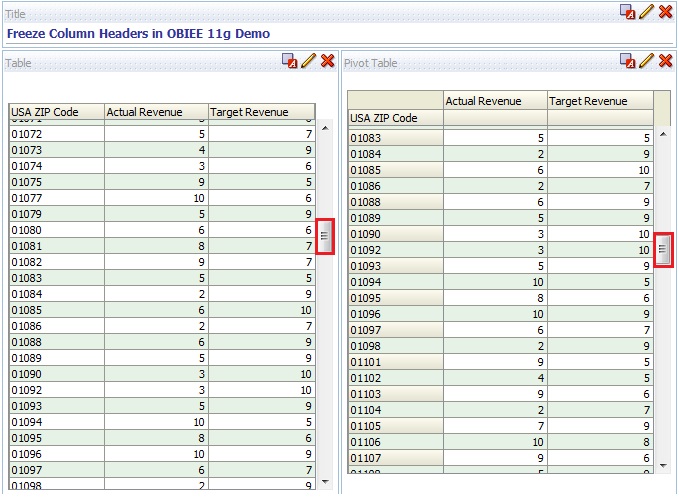
We have a new feature in OBIEE 11.1.1.6.0 that freezes the data column header. So when a user scrolls down to the bottom of the report, the column header stays in place and only the data rows move. This is similar to the ‘Freeze Panes’ option in MS Excel.
By default this Freeze option is not enabled. We need to turn ON by adding set of attributes in  instanceconfig.xml file under <Views> element, between <GridView>… </GridView> class.


To do this..
Navigate to the path “<MiddlewareHome>\instances\instance2\config\OracleBIPresentationServicesComponent\coreapplication_obips1″ and open instanceconfig.xml file  and add the below entry between <Views> and </Views> tag

<GridViews>
<DefaultScrollingEnabled>true</DefaultScrollingEnabled>
<DefaultRowFetchSlicesCount>400</DefaultRowFetchSlicesCount>
<DefaultColumnFetchSlicesCount>300</DefaultColumnFetchSlicesCount>
<DefaultFreezeHeadersClientRowBlockSize>100</DefaultFreezeHeadersClientRowBlockSize>
<DefaultFreezeHeadersClientColumnBlockSize>15</DefaultFreezeHeadersClientColumnBlockSize>
</GridViews>


The entry in instanceconfig.xml should looks as below screenshot.


Note: Here I am enabling the Column Header freeze option with the Scroll bar if my request contains more than 400 records.
E.g. in Table view and Pivot view


I configured for 400 rows, So..what happens if the record count increases after 400 records?
We can click on “Get more rows” to get more rows as shown in below screen.


Try this it works.

Compare features in OBIEE 10g and 11g

When we compare OBIEE 10g and OBIEE 11g, there is lot of enhancements in services provided by OBIEE 11g and some changes in terminology is also there in OBIEE 11g.

Some important points/enhancements in OBIEE 11g when compared to OBIEE 10g are listed below
  1. OBIEE 11g uses WebLogic Server as the application server as compared to Oracle AS or OC4J in OBIEE 10g.
  2. The clustering process in much easier and automated in OBIEE 11g.
  3. We can now model lookup tables in the repository.
  4. The new UI called Unified Framework now combines Answers, Dashboards, and Delivers.
  5. A new column called the hierarchical column in introduced.
  6. BI Publishers is fully and seamlessly integrated with OBIEE 11g.
  7. New time series functions PERIOD ROLLING and AGGREGATE AT are introduced.
  8. In OBIEE 11g we can create KPIs to represent business metrics.
  9. The aggregate persistence wizard creates indexes automatically.
  10. The session variables get initialized when they are actually used in OBIEE 11g unlike OBIEE 10g where they were initialized as soon as a user logs in.
  11. OBIEE 11g now supports Ragged (Unbalanced) and Skipped Hierarchy.
  12. You can also define Parent-Child hierarchy in OBIEE 11g as well.
  13. SELECT_PHYSICAL command is supported in OBIEE 11g.
In OBIEE 11g there are some changes in the terminology as well.
  • iBots are renamed as Agents.
  • Requests are renamed as Analyses.
  • Charts are renamed as Graphs.
  • Presentation Columns are renamed as Attribute Columns. 

What are the primary differences between the OBIEE 10g and 11g security models and what happens during upgrade?


Security Task/Object OBIEE 10g OBIEE 11g What happens during upgrade from 10g to 11g?
Define Users and Groups in RPD file using OBIEE Admin Tool Default N/A. By default, users are defined in embedded WLS LDAP via FMW EM Console, or alternatively, in external LDAP. By default, existing users and groups migrated to embedded WLS LDAP. Existing groups are automatically mapped to an Application role.
Defining security policies Policies in the catalog and repository can be defined to reference groups within a directory. Policies are defined in terms of application roles, which map to users and groups in a directory. 10g catalog groups are automatically migrated in the upgraded catalog and assigned the same privileges, access and membership.
“Administrator” user Unique user with full administrative privileges. No single user named tor full administrative privileges. Administration can be performed by any user who is member of BIAdministrators group. “Administrator” user automatically added as member of “BIAdministrators” group in embedded WLS LDAP and granted Administrator role. The user specified during OBIEE 11g installation (i.e. “weblogic”, “biadmin”) is also a member of the BIAdministrators group.
Repository Encryption Available on sensitive elements only - i.e. user passwords, connection pool passwords, etc. Entire RPD encrypted via a password. Prompted to set a repository password while running the upgrade assistant. Do not lose this password as there is no feature to recover a lost password.
External Authentication and OBIEE Initialization (Init) Blocks Init blocks are required for external PDAP or external table authentication. Init blocks not required for WLS embedded LDAP. Init blocks are required for external LDAP or external table authentication. Upgraded RPD will continue to point to 10g LDAP or external tables. Initblocks may need to be modified to ensure that depreciated, or reserved word, variable names are renamed. NOTE: If you intend to use another LDAP server, such at Oracle Identity Management (OID), then you must upgrade to the embedded LDAP server. Please see Upgrade Guide for further details.
Catalog Groups Defined in Presentation Server Administration link Available for backward compatibility. Use of Application Roles in FMW EM Console recommended. Existing groups will be migrated. Recommendation is to use application roles instead. Privileges on catalog objects may be granted to an application role via BI Presentation server Administration link.
SA System Subject Area Optional Available for backward compatibility and requires init blocks and external tables. Use of Embedded LDAP is recommended. Upgraded 10g RPD will point to external tables, Initblocks may need to be modified to ensure that depreciated, or reserved word, variable names are renamed.
“Everyone” Presentation Server Group Default Replaced with AuthenticatedUser role. “Everyone” group migrated to AuthenticatedUser role.


I just want to consolidate basic difference between the legacy (!) OC4J instance for OBIEE 10g and the newbies Weblogic Server Instance for OBIEE 11g and viola …. here you go …